

Appearance
Review a coding round
Who can do thisEveryone in the workspace, including viewers
When a candidate submits, the hidden checks run on Infyva's servers and an AI review reads the code and the session. The report shows the result, the evidence behind each score, and a replay of how the candidate worked. A person on your team makes the decision.
Open the report
- Open the job and click Settings > Vibe coding.
- Under Rounds sent for this job, click Open report next to the candidate.
The round also shows on the candidate in the job, and the score appears in the list once it is ready. While the review runs, the score reads Scoring… and the report says "The AI review is still running. This page updates by itself."
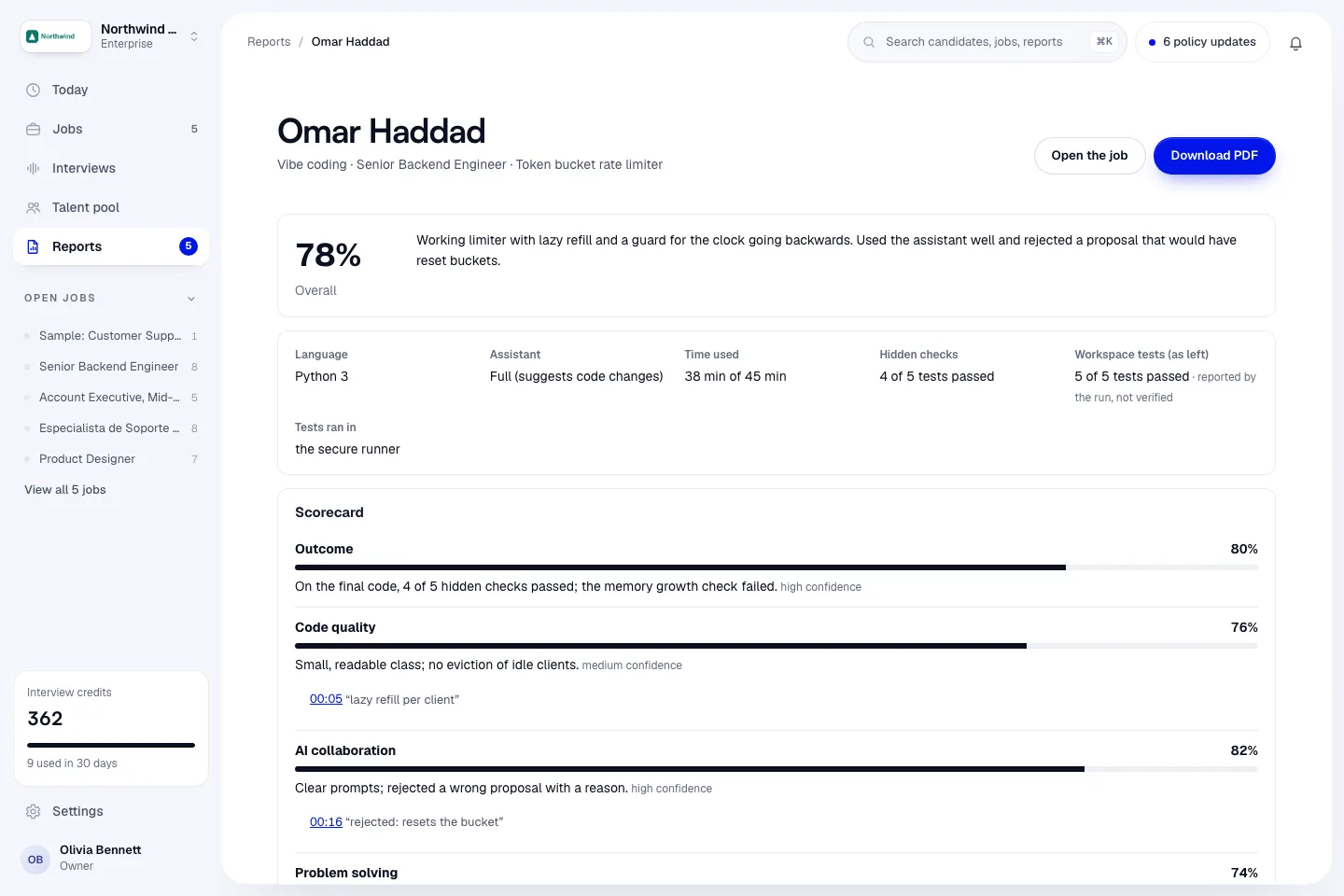
What the report shows
Facts
Language, Assistant, Time used (with time ran out when the round was submitted at the deadline), Hidden checks, Original task tests, Workspace tests (as left) and Tests ran in. Test results from the candidate's workspace are marked "reported by the run, not verified".
Scorecard
A score for each area, with the reason, a confidence level and quotes from the session. Click a time next to a quote to jump to that moment in the replay.
The overall score weighs:
| Area | Weight |
|---|---|
| Outcome | 40% |
| AI collaboration | 25% |
| Code quality | 20% |
| Problem solving | 15% |
Outcome comes only from the hidden checks. The other scores come from an AI review that has to cite moments from the session. A score without a citation is capped at 50. An area that couldn't be assessed shows Not assessed and is left out of the overall score.
Strengths, concerns and follow-up questions
Strengths, Concerns and Ask in the next interview, with questions to explore with the candidate.
Hidden checks
Each check with a pass or fail mark and any message.
How the candidate worked
Messages to the assistant, suggestions accepted and rejected, test runs, accepted suggestions never tested afterwards, times the candidate left the tab, and large pastes. Tab switches and pastes are signals to ask about, not proof of anything.
Replay
The session in order: the candidate's requests, the assistant's replies, suggested changes and whether they were accepted or rejected, and test runs. Filter by Key moments, Assistant, Test runs or Everything.
Final code
Changes from starter shows what the candidate changed in each file. Click a file name to see that file as the candidate submitted it.
Task, success criteria and rubric
The brief, Done means and Reviewer rubric the round was set with.
If something is still pending
| Message | What to do |
|---|---|
| Hidden checks have not run yet because the secure runner was unavailable | The outcome score is capped and marked provisional. Click Run hidden checks now. |
| The AI review didn't finish | Click Try again. |
| This round is not started yet, in progress, expired or cancelled | The report fills in after the candidate submits. |
Download a PDF
Click Download PDF at the top of a submitted report. See PDF reports.