

Appearance
Single sign-on
Available onEnterprise
Who can do thisWorkspace owners (admins can view the settings and set the default role)
Single sign-on (SSO) lets your team sign in to Infyva with their work account from your identity provider, such as Microsoft Entra ID, Okta or Google Workspace. Infyva supports SAML 2.0 and OpenID Connect (OIDC).
Pick your guide
Microsoft Entra ID (SAML)Enterprise application, claims and assignment.Microsoft Entra ID (OIDC)App registration, client secret and optional claims.Okta (SAML)SAML 2.0 app integration with attribute statements.Okta (OIDC)OIDC web app with a client secret.Google WorkspaceCustom SAML app, or a Google OAuth client.Other SAML providersOneLogin, JumpCloud, PingOne, ADFS and others.Other OIDC providersAny provider with a discovery URL.
How it works
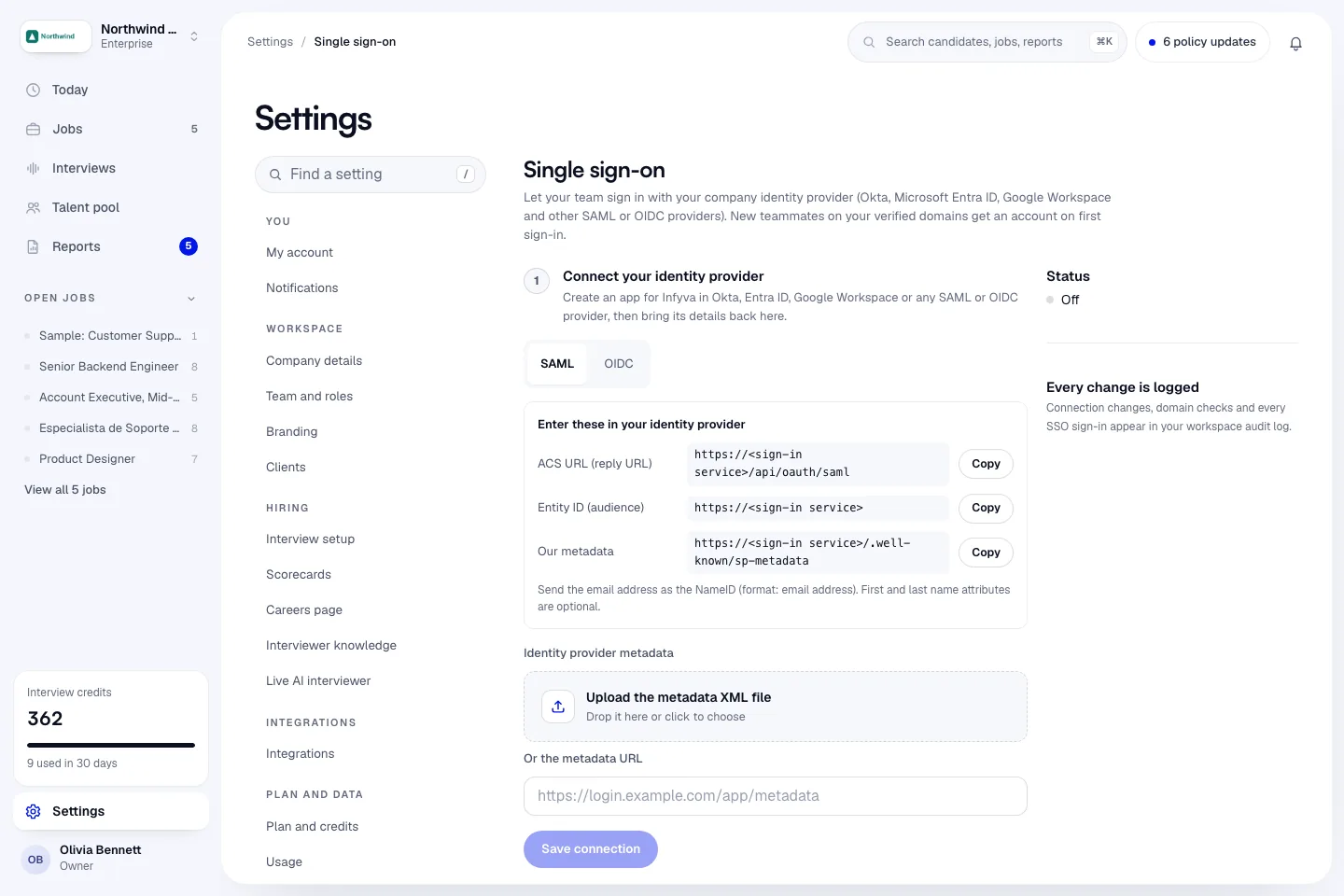
Setup is three steps on one page: in the sidebar click Settings, then Single sign-on (under Security).
- Connect your identity provider. Create an app for Infyva in your provider using the values Infyva shows, then bring the provider's metadata (SAML) or discovery URL, client ID and secret (OIDC) back to Infyva.
- Verify your email domain. Add a DNS TXT record to prove you own the domain your team's email addresses use. Only people on verified domains can sign in with SSO.
- Turn it on. Switch on Allow sign-in with SSO, test with your own account, then, if you want, switch on Require SSO.
When SSO is on, people sign in by typing their work email on the Infyva sign-in page and clicking Sign in with SSO. Infyva sends them to your provider and back.
Before you start
- Your workspace is on Enterprise. Talk to sales to upgrade.
- You are a workspace owner. Only owners can connect a provider, verify domains, or change who can sign in. Admins can see the page and set the role new teammates get.
- You are an admin of your identity provider, or you are working with one.
- You can publish a DNS TXT record for your email domain.
If the page shows Set up single sign-on with Coming soon, SSO is not switched on for your workspace yet. Email support@infyva.ai.
Values your provider needs
These are the same for every Infyva workspace. Your provider asks for them when you create the Infyva app.
| In Infyva | Paste into | Value |
|---|---|---|
| ACS URL (reply URL) | ACS URL / reply URL | https://sso.infyva.ai/api/oauth/saml |
| Entity ID (audience) | Entity ID / audience | https://sso.infyva.ai |
| Our metadata | Service provider metadata (if your provider can import it) | https://sso.infyva.ai/.well-known/sp-metadata |
| In Infyva | Paste into | Value |
|---|---|---|
| Redirect URL | Redirect URI / callback URL | https://sso.infyva.ai/api/oauth/oidc |
For SAML, send the email address as the Name ID, with the format Email address. First and last name attributes are optional. For OIDC, ask for the openid, email and profile scopes.
What happens to accounts
- New people on a verified domain get an Infyva account the first time they sign in with SSO, with the role you choose in New teammates join as (Recruiter or Viewer). Team members are unlimited on every plan.
- Existing teammates sign in with SSO using the same email address. Their account and history stay as they are.
- Owners can always sign in with a password, even when SSO is required, so you cannot lock yourself out.
Details: Accounts, roles and limits.
Every change is logged
Connection changes, domain checks, SSO sign-ins and failed SSO sign-ins appear in your workspace audit log.