

Appearance
Webhooks
Who can do thisWorkspace owners and admins
Infyva sends a signed JSON POST to your HTTPS endpoint when something happens in your workspace. Use webhooks to update your own systems, or to trigger Zapier and Make.
Webhooks live on the Developer platform page. To open it: in the sidebar, click Settings, then API keys and webhooks. The webhooks section is on Pro, Enterprise and the Pro trial. The API keys section on the same page is on Enterprise.
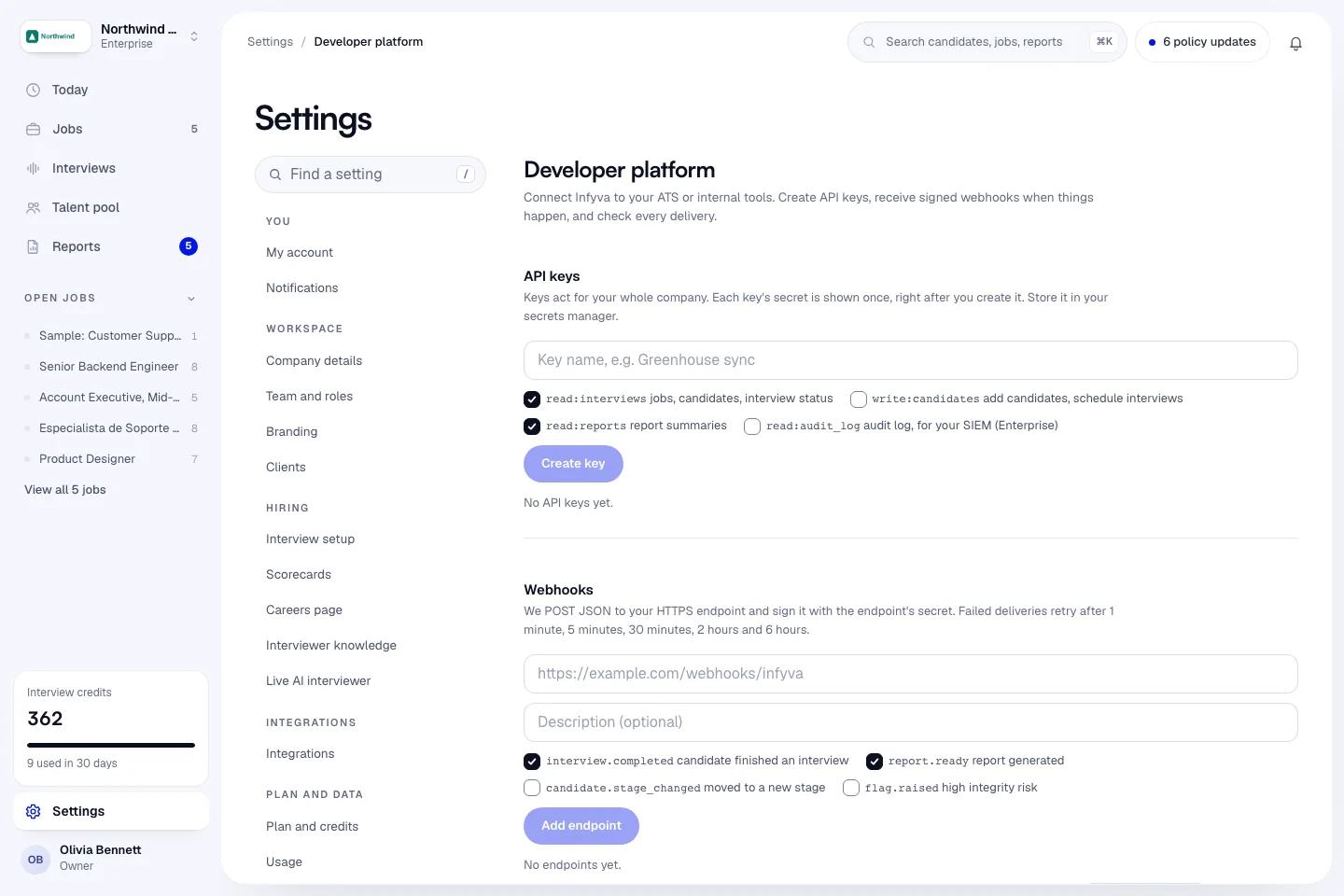
Add an endpoint
- Open Settings > API keys and webhooks.
- In Webhooks, enter your endpoint URL, for example
https://hooks.northwindlabs.com/infyva. - Optionally add a Description, up to 200 characters.
- Tick the events you want.
interview.completedandreport.readyare ticked for you. Pick at least one. - Click Add endpoint.
- Copy the signing secret that appears. Signing secret for this endpoint. Copy it now; it won't be shown again. Store it with your receiver's other secrets, then click Done.
Secrets start with whsec_. After you close the box, the endpoint shows only the first characters of the secret, for example Secret whsec_AbCd....
URL rules
| Rule | Message if it is broken |
|---|---|
The URL must be complete and start with https://. | Enter a full URL starting with https:// / Webhook URLs must use https:// |
| No user name or password in the URL. Verify the signature instead. | Don't put credentials in the URL; verify our signature instead |
The host can't be localhost or end in .local or .internal. | Webhook URLs must be publicly reachable |
| The host must resolve to public IP addresses only. This is checked at every delivery, not when you save. A delivery to a private address fails and shows in the Delivery log. | Webhook host resolves to a non-public address |
| At most 2,048 characters. | URL is too long |
| At most 10 endpoints per workspace, paused ones included. | A company can register at most 10 endpoints |
Events
| Event | When it is sent | data fields |
|---|---|---|
interview.completed | A candidate finished an interview. The report follows shortly after. | interview_id, session_id, candidate_id, job_id, completed_at |
report.ready | The interview report and score are ready. | report_id, session_id, interview_id, candidate_id, job_id, overall_score. On a corrected report also correction, previous_report_id, previous_score. |
candidate.stage_changed | Someone moved a candidate to another stage on a job. | job_id, candidate_id, stage, changed_by, and sometimes previous_stage |
flag.raised | A report has a high-risk integrity result for a person to review. | report_id, session_id, interview_id, candidate_id, job_id, flag_type (always integrity), risk_level (HIGH_RISK or CRITICAL) |
Events are sent only while your plan includes webhooks, and only to endpoints that are active and subscribed to that event.
Field notes
candidate_idmeans different things in different events.- In
candidate.stage_changedit is the job-candidate record: the candidate's place on that job. It is the same value asidin the API's list of a job's candidates andcandidate_idin the API's interview response. - In
interview.completed,report.readyandflag.raisedit is the candidate's person ID in Infyva, which stays the same across jobs. To get the job-candidate record for these events, call the API's get-an-interview endpoint withinterview_id.
- In
job_idis the Infyva job. It can benullif the interview is not tied to a job.stageis the stage the candidate moved to, for exampleinterviewed. Most moves use the stagesapplied,screened,interviewed,offer,hiredandrejected.previous_stageis included for some kinds of moves and not others (a move on the board does not include it), so treat it as optional.changed_byis the user ID of the teammate who moved the candidate.completed_atis the completion time in UTC as a string, in the form2026-10-18 15:04:11.123000(a space between date and time, no time zone suffix). Parse it with that in mind.overall_scoreis the report's score out of 100.- Corrected reports. If a report is re-graded after review (see Retry and re-grading),
report.readyis sent again with"correction": true, the earlier report's ID inprevious_report_idand its score inprevious_score.flag.raisedis not sent again for a correction.
The envelope
Every event has the same outer shape:
json
{
  "id": "evt_8f14e45fceea167a5a36dedd4bea2543",
  "type": "report.ready",
  "created": "2026-10-15T14:02:11Z",
  "organization_id": "6adc2866a0b4af3b1cfb3288",
  "data": {
    "report_id": "6adc286ba0b4af3b1cfb32de",
    "session_id": "6adc2872a0b4af3b1cfb33a1",
    "interview_id": "6adc2871a0b4af3b1cfb3390",
    "candidate_id": "6adc2867a0b4af3b1cfb3301",
    "job_id": "6adc2869a0b4af3b1cfb32a3",
    "overall_score": 78
  }
}| Field | What it is |
|---|---|
id | The event ID, evt_ and 32 hex characters. The same event sent to two endpoints has the same id. |
type | The event name. |
created | When the event was created, UTC, to the second. |
organization_id | Your workspace ID. |
data | The event's fields, as above. |
Headers
| Header | Value |
|---|---|
Content-Type | application/json |
User-Agent | Infyva-Webhooks/1.0 |
X-Infyva-Event | The event name, for example report.ready. |
X-Infyva-Delivery | The delivery ID. It stays the same across retries of one delivery, so you can use it to skip duplicates. |
X-Infyva-Timestamp | Unix time in seconds when this attempt was signed. |
X-Infyva-Signature | t=<unix seconds>,v1=<hex signature> |
Verify the signature
Check every delivery before you trust it:
- Read
tandv1fromX-Infyva-Signature. - Reject the delivery if
tis more than five minutes from your server's clock. - Compute an HMAC-SHA256 with your endpoint's signing secret over the string
<t>.<raw body>: the value oft, a full stop, then the request body exactly as received. - Hex-encode the result and compare it to
v1with a constant-time comparison.
Use the raw body. If your framework parses the JSON first and you serialize it again, the bytes change and the signature will not match.
Node.js
js
// Express: keep the raw body for this route.
const crypto = require('crypto')
const express = require('express')

const app = express()
const SECRET = process.env.INFYVA_WEBHOOK_SECRET // whsec_...

function verifyInfyva(rawBody, header, secret, toleranceSeconds = 300) {
  if (!header) return false
  const parts = {}
  for (const piece of header.split(',')) {
    const i = piece.indexOf('=')
    if (i > 0) parts[piece.slice(0, i).trim()] = piece.slice(i + 1).trim()
  }
  const t = Number(parts.t)
  if (!Number.isInteger(t) || !parts.v1) return false
  if (Math.abs(Math.floor(Date.now() / 1000) - t) > toleranceSeconds) return false

  const expected = crypto
    .createHmac('sha256', secret)
    .update(`${t}.`)
    .update(rawBody) // a Buffer with the exact bytes received
    .digest('hex')

  const a = Buffer.from(expected, 'utf8')
  const b = Buffer.from(parts.v1, 'utf8')
  return a.length === b.length && crypto.timingSafeEqual(a, b)
}

app.post('/infyva', express.raw({ type: 'application/json' }), (req, res) => {
  if (!verifyInfyva(req.body, req.get('X-Infyva-Signature'), SECRET)) {
    return res.status(400).send('Bad signature')
  }
  const event = JSON.parse(req.body.toString('utf8'))
  res.sendStatus(200) // answer within 10 seconds, then do the work
  // handle event.type and event.data here
})

app.listen(3000)
Python
python
# Flask. verify_infyva mirrors the verifier Infyva uses in its own tests.
import hashlib
import hmac
import os
import time

from flask import Flask, request

app = Flask(__name__)
SECRET = os.environ["INFYVA_WEBHOOK_SECRET"]  # whsec_...


def verify_infyva(secret: str, header: str, body: bytes, tolerance_seconds: int = 300) -> bool:
    try:
        parts = dict(p.strip().split("=", 1) for p in header.split(","))
        ts = int(parts["t"])
        sig = parts["v1"]
    except (AttributeError, KeyError, ValueError):
        return False
    if abs(int(time.time()) - ts) > tolerance_seconds:
        return False
    signed = f"{ts}.".encode("utf-8") + body
    expected = hmac.new(secret.encode("utf-8"), signed, hashlib.sha256).hexdigest()
    return hmac.compare_digest(expected, sig)


@app.post("/infyva")
def infyva_webhook():
    body = request.get_data()  # raw bytes, before any JSON parsing
    if not verify_infyva(SECRET, request.headers.get("X-Infyva-Signature", ""), body):
        return "Bad signature", 400
    event = request.get_json()
    # handle event["type"] and event["data"] here, ideally in a background job
    return "", 200
Delivery and retries
- Any
2xxresponse within 10 seconds counts as delivered. - Redirects are not followed. A
3xxcounts as a failure, so give Infyva the final URL. - Anything else, or a network error or timeout, is retried after 1 minute, 5 minutes, 30 minutes, 2 hours and 6 hours. That is six attempts in total. After the last one the delivery is marked Failed.
- Infyva never sends an unsigned delivery.
Answer quickly and do slow work afterwards. Because of retries, your endpoint can receive the same delivery more than once: skip ones you have already handled, using X-Infyva-Delivery or the event id.
Manage endpoints
Each endpoint shows its status (Active or Paused), its events, the start of its secret and its last delivery.
| Button | What it does |
|---|---|
| Send test | Sends a webhook.test event to this endpoint now, with no retries. The result shows as Delivered. Your endpoint answered 200. or Not delivered. with the error. Only active endpoints can be tested. |
| Pause / Resume | Paused endpoints get no new events, and deliveries still waiting for a retry are cancelled. |
| Rotate secret | Creates a new signing secret and shows it once. The old secret stops working right away, so update your receiver at the same time. |
| Delete | Stops sending events to the endpoint and cancels pending retries. |
The test event's data is {"message": "This is a test event from Infyva. Your endpoint is reachable."}.
Read the delivery log
The Delivery log below the endpoints lists the most recent deliveries. Pick an endpoint in the filter or leave All endpoints, and click Refresh to reload.
| Column | What it shows |
|---|---|
| Event | The event name. Test deliveries are marked Test. |
| Status | Queued, Sending, Delivered, Retrying, Failed or Cancelled. |
| Attempts | How many attempts were made. |
| Response | Your endpoint's HTTP status code and the start of the error, if any. |
| Created | When the event was created. |
| Next retry | When the next attempt is due, for deliveries that are retrying. |